
Your Aadhaar Card is one of the most important identity documents in India. Whether you need it for bank verification, government schemes, SIM activation, passport applications, or address proof, having a digital copy of your Aadhaar can save time.
The good news is that you can download your Aadhaar Card online within a few minutes through the official UIDAI website. You don’t need to visit an Aadhaar Enrollment Center if your mobile number is already linked with your Aadhaar.
How to Download Aadhaar Card Online Using Aadhaar Number
Step 1:- First, visit the official website by clicking on the link provided above.
Step 2:- Click on the “Download Aadhaar” option available on the homepage.
Step 3:- Enter your 12-digit Aadhaar Number.
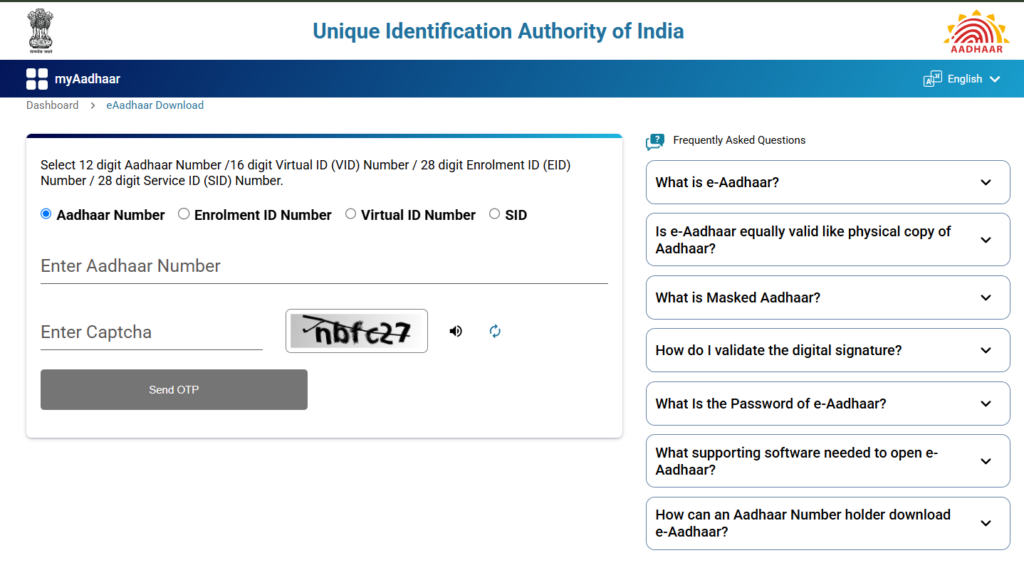
Step 4:- Complete CAPTCHA Verification:- Type the security code shown on the screen.
Step 5:- Click on “Send OTP.” An OTP will be sent to your registered mobile number.
Step 6:- Enter the OTP and click on “Verify & Download.”
Your Aadhaar Card PDF will be downloaded instantly.
What is the Password for e-Aadhaar PDF?
Password Format :-
First 4 letters of your name in CAPITAL letters + Birth Year (YYYY)
Benefits of Downloading Aadhaar Online
Downloading Aadhaar online offers several advantages:
- Instant access anytime
- Free of cost
- Legally valid
- Secure PDF format
- Can be printed anytime
- Easy to store on mobile or computer